
|
 Welcome to MyPitSelf Welcome to MyPitSelf
|
 English(US) English(US)
 Français(FR) Français(FR)
|
This documentation has been produced with MyPitSelf00817 |
|
|
|
Welcome to MyPitSelf
|
|
English(US)
Français(FR)
|
This documentation has been produced with MyPitSelf00817 |
 Welcome to MyPitSelf
MyPitSelf© is a tool to write information system linked to databases. Its design allows the reverse-engineering of the programs
It is an information system like an other but instead of dealing with bank accounts, mails, websites, process ... it deals with programs and databases.
Like the other Systems, one can always think of a new function to implement, there is no limit.
And what allows a System to be able to evolve without limits is linked to the recursivity principle which says that by feed-back on all or a part of the initials elements, a small number of initial elements are enough to build an infinite serie of elements.
Reverse-ingenering is a recursive process. MyPitSelf is a possibility to implement programs with this principle.
Keeping this way of thinking, the first program written with MyPitSelf is MyPitSelf itself (it doesn't seem important but it is, really).
This principle is implemented with:
- A method to resolve the paradigme of the access to the data in database.
- A language which uses this method and which also allows to put the sentences as data and back.
A part of this documentation is not too technical ( see general presentation ), the other chapters are.
MyPitself uses MySql, Php, SVG, Apache, HTMLArea, linux, firefox, Win2K/XP/IE6/7, and last but not the least itself .
The name MyPitSelf comes from MySql, Php and itself
 |


I had a difficulties when I had to maintain or develop programs with data designs like the one presented underneath:
)
 button on top of the new window to close it.
In this case one updates the programs and now, one can really start to enjoy the work because with the appreciation of what the designer understood, and the consideration of what the programer intended to program we have to tell the user that the job will be done in x days for a price of y$. This has always been, for me, a task between a probability level (It should fit in these constraints) and a mystic level (Hope it will work).
So, as I didn't like this situation, I started to develop a tool to help myself.
I went on and as the program grew up, I reached the conclusion that one had to industrialize the development of the programs. To do this, the design stage and the writing stage of the programs had to be industrialize.
And to do this, I reached the second conclusion that programs had to be able to be reverse-engineered by it's own means.
But I had to find the way to do it.
As one is never better helped than by one self, I built MyPitSelf
 .
As the reverse-engineering is set up and the first program done with MyPitSelf is MyPitself, I think that the foundations are not too bad.
The data model you have seen above during 5 seconds is the MyPitSelf data design !
.
As the reverse-engineering is set up and the first program done with MyPitSelf is MyPitself, I think that the foundations are not too bad.
The data model you have seen above during 5 seconds is the MyPitSelf data design !
Once I asked a teatcher in science history and science philosophy what was the limit of this development. He ansewered by the sentence you have read upper about unlimitted systems.
Practically, the limit of the system is bordered by the computer speed and memory but at least, it is far enough now.
Simple programs can be set up fast once one knows the development environment. But it's not all that obvious because it's different from what I have seen before. (You have been warned).
One can also make some more complicated things, for example MyPitSelf is not simple. It's a development environment which contains multi user access with rights, multilingual, multibase, with several environments ( development, tests, production), backups, documentation with screen copies, etc ...
I have used MyPitSelf to build programs with other users than myself and data designs that looked like these
)
)
)
)
) .
.
I started to use the reverse-engineering to maintain MyPitSelf: for example, I once defined the use of a function which was not very clean and I wanted to update all programs to change this. As I used this function very often, I wrote a program in the MyPitSelf language to do this. MyPitSelf can maintain MyPitSelf ! As this program has already been written, it will not be too complicated to update it, if I have to write a modification on an other function.
Some people also call this refactoring.
An other example comes when one renames a field in the database. In this case, all function that use this field are treated to replace the old name by the new one.
What follows on this web site is more serious stuff because I explain how all this works. These explanations can make you believe that I contemplated before I proceeded. As a matter of fact, in the whole process actions have preceded the thought process. I prefer a tool that works rather than a concept that does not work.
There is still work to do, some parts are still dirty but now, I'm not afraid to clean up, and I am sure I will be able to benefit from it.
Actually, at the moment, I am setting up the environment to work with ajax, you will see my first attempts here.
Now, let's go to work !
)
You start by defining a working environment ie databases (fields, tables, indexes, links between data ...) and other features (constants, user rights, menu ...).
Then you generate simple SQL requests with the help of a tool that keeps the request parameters in the system (type of request, tables and fields of the request).
Some request are used to see the data (SELECT of a certain value or SELECT of a list of values).
Others are translated to functions that you can use in the MyPitSelf language (SELECT, INSERT, UPDATE, DELETE).
This is where the database paradigme is resolved: as the access to the data is done with functions and these functions are used in the programs, there are no SQL request in the middle of the programs.
A language based on function calls is used to write functions in source format.
It uses usual features of other languages (variables, tests, loops, files/IOs, ...)
and the functions produced by the requests.
This language is compiled and interpreted for interactive programs.
After source parsing, the system produces a table format.
The table format can be put in the database to be computed (reverse-engineered). Functions become data.
The system can regenerate the source format from the table format.
Out of the table format, the system produces executable code (in php today).
The difference with an other language is that the table format of the program
which is the result of the parsing is available and can be treated with the means
of the language.
It is like if you were the person who had written the compiler
and so you would know how to write the parser, and, at the end of the parsing
process, you would be able to rewrite the source.
So, I think that MyPitSelf resolves ( and will resolve ) some problems in information technology:
Problem:
An application evolves in two directions: data to maintain and function to give.
Today one can add data ( for example if you have 50 or 100 emails in your email box doesn't change many things ) but to add a function is less evident ( for example the sum of mails from Paul and Jack )
The need of complexity requires an industrial treatment. If the code checking is done by humans, some bugs will probaly appear goes in the programs
Answer:
When the basic functions on data are set up, the arrengement of these function to give more complex functions is easier to set up if we consider them as operations on data ( add the mails from Paul to the mails from Jack ).
If MyPitSelf, functions are transformed as organized as data in database and a data check is a current operation that can be done whith the right program.
Problème:
The data to manage are defined with a model and some rules that are justified during the primary design and according to the person who does the design.
But the resultant system must evolve in the time because during it's use some new functions are neded.
And furthermore, some parts that were important during the primary design become less important and some new ones become more important. In this case, the primary design must evolve to adapt to these new parts.
The important point is not the primary design but its flexibility and the possibility to use the existing parts.
Réponse:
The first system done with MyPitSelf is itself. First there was only the core then data heve been added then functions on these data, then the core has been updated and so on. In othe words the first data and system design has evolved along its growing. Systems done with MyPitSelf grow with the same logical way.
Today the data are enough for the development in the current version. The functions needed to build a development environment represent a good part of what one can imagine to build an information system, but some new needs like statistics or graphical outputs may be needed. Once they will be inserted in MyPitSelf, the other systems will be able to use them.
MyPitSelf is good enough even if it is only version 0.8 because the reverse-engineering is ready.
This means that if MyPitSelf Evolves, programs built with older versions will follow the new versions.
95 % of the developments are done via a web browser, with only the administrator having access to the server
It is multilingual at the system level, MyPitSelf is in English (well, my English) and in French
It is multilingual at the program level, the programs one develops can be seen in the languages the user selects
The functionnal documentation of your programs is facilitated due to the reverse-engineering and
 .
.
.
.
MyPitSelf is a system to develop and maintain programs and data in a database.
Each development has its own environment with:
One "system" database containing:
- the description of the data,
- the source of the programs,
- a list of settings like constants, working directories....
One or more "data" databases containing the data to maintain.
During the development, environments are included in the main environment.
After the development mode, one can produce a set which is independant of the main environment.
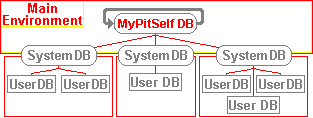
As a developer, with MyPitSelf, you will build the environments for other programs and fill the "system" databases of the other programs.
Its target is to develop multi-user programs so there is a user authorization context with password entry.
Three main reasons:
1°) Databases are good to store and use data. They can also be good to store and use programs. The programs had to be written in a way that they can be organized in a database, so that they can be linked to the data they compute. That is why there is a language. This also means that programs are considered as data, consequently, one can treat programs like data.
2°) Once the data are defined, the programs compute them. In this system, the first step is to define all the data needed, after which the programs can be written. The original types of data are those given by the database.
3°) The first program done with this system is the system itself because if this system can organize and compute any data, it can organize and compute a system to organize and compute data.
| This explains the loop in this image |
)
|
Thanks to PHP, MySql, Javascript and Apache with Linux/Win2K on Firefox/IE.
The tools used are mainly MyPitSelf, The W2k NotePad, and PhpMyAdmin.
Lcc has been used to write a program to launch Batch jobs, It is an adaptation of mikehup.exe written by Michael Kohn (naken@naken.cc), Web page: http://www.naken.cc/
I use SVG to draw the tables with the links.
PHP us used to write the basic functions.
All user functions should be written in the MyPitSelf language. The basis of this language is:
It is also based on:
Note on the translation: although I'm french, I started to write this software in english afterwhich I added the possibility to have a localised ( french in my case ) version on-line, so I could write in both languages, especially this documentation.
Some chapters have been written directly in french, then translated into english. For others, it is the opposite. Mark has corrected a part of the English translation, The good english comes from him, I assume all the errors.
As a result of time constraints, there are sometimes differences in documentation but I think these are of minor importance and you will know how to deal with them.
I will will concentrate on the French version and the English version. If other contributors accept to translate this software in other languages, I'll be able to propose their traductions in the distribution.
Later in this documentation, ( chap How TO'S ), I talk about the translation.
Never Finished because I always want to add some more functions! But good enough to have some production programs.
Currently, functions like versioning, testcase scenarios, automatic documentation, Internationalisation ... that I have started but they are not achieved yet.
At least, the existing ones allowed me to do what you are going to see ( if you go on ).
I can't tell you when the next version will come out because I can't do this at 100%.
Now, let's see what it looks like.
Suppose you have a data model with a table of information about people (names, age etc.).
Also suppose that you have generated several requests with the system, including the one which has the number, say, 1012.
SELECT   T0.Id,T0.Name,T0.Age
FROM     $Data.People T0
WHERE    T0.Age <= %SQLPAR0%
ORDER BY T0.Name ASC
A function called R_1012_Select() has then been generated and it takes one parameter which is the age (xxx).
A possible use of this function could be to output all the people whose ages are >= 30.
This will give a program which looks like (comments are preceded by //) :
Tac(                // Take and call: put values in the call stack and/or call functions.
 Cst(30),           // constant 30 pushed in the call stack
 R_1012_Select(     // select list of these people (1 parameter xxx taken from the call stack)
  Do(
   Take(T0.Name),   // Pushes the name in the call stack
   out(1)           // displays the first element contained in the call stack
  )                 // The name is popped here
 )
)
Remarque: lines breaks are ignored, one can also write this function like:
Tac(Cst(30),R_1203_Select(Do(Take(T0.Nom),out(1))))
Tac(
 Cst(30)
 R_1203_Select(
  Do(Take(T0.Nom),out(1))
 )
)
Blocks comments are delimited by /* and */ , they MUST start at the first column and can be nested.
This program has this table format: :
| Ind | Function # | Parent # | Order In Parent |
Function Name |
Function Type |
Number Of Children |
Level | C1 | C2 |
| 0 | 0 | -1 | 0 | 0 | INIT | 1 | 0 | ||
| 1 | 1 | 0 | 1 | Tac | formula | 2 | 1 | ||
| 2 | 2 | 1 | 1 | Cst | formula | 1 | 2 | ||
| 3 | 3 | 2 | 1 | 30 | Value | 0 | 3 | ||
| 4 | 4 | 1 | 2 | R_1203_Select | formula | 1 | 2 | ||
| 5 | 5 | 4 | 1 | Do | formula | 2 | 3 | ||
| 6 | 6 | 5 | 1 | Take | formula | 1 | 4 | ||
| 7 | 7 | 6 | 1 | T0.Name | zone | 0 | 5 | ||
| 8 | 8 | 5 | 2 | out | formula | 1 | 4 | ||
| 9 | 9 | 8 | 1 | 1 | Value | 0 | 5 |
< ? php
function f_5001(){
 global $XVS,$XCS;  // variable stack and call stack
 $xxSI=sizeof($XCS);  // call stack init pos
 $xxSC=0;  // Stack push count
 //===== Start of function =====
 //===================
 $req4 = "
 SELECT  T0.Nom  FROM  `Gens` T0
 WHERE  T0.Age<=30
 ORDER BY  T0.Nom ASC " ;
 //===================
 $result4=mysql_query($req4);
 if(mysql_errno()==0){
  while($mpsrow4=mysql_fetch_row($result4)){
   echo ''.$mpsrow4[0].'
';   // output
  }
 }else{
  return(xxErrSql('1203_SELECT',mysql_error(),$req4,$xxSI));
 }
 mysql_free_result($result4);
 //===== End of function =====
 return(true);
}
?>
This example is quite simple but you will see by a click here
something which is not: it is one of the function which does reverse ingineering of the execution of a program, it updates the table format of the function.
I assume that Apache (1.3.29), Php (4.3.3), MySql (4.0), firefox or IE(6.0) are running fine on your system. The versions numbers are the one I currently use but I suppose that it will work with newer versions.
I assume that you know a minimum on these software and particulary the way to make them run together.
If this is not the case, please see the enormous amount of documentation about them.
There are two files to Unzip:
The mypitselfw ( Web files ) to unzip in the htdocs folder of the web server
The mypitselfp ( Program files ) to unzip somewhere else but not in a htdocs subfolder.
On a linux system, you should thew execute these commands:
cd /var/www # assuming that you have put the folders mypitselfw and mypitselfp in /var/www
chmod -R o+w mypitselfp
chmod -R o+w mypitselfw
cd mypitselfp
chown root:root batch_linux.exe
chmod -R o+x batch_linux.exe
The use of php.ini-recommended given with your php installation is strongly recommended
Anyway, if you use something else at your own risk, at least check that that the settings below are:
register_globals = Off
I use the setting
display_errors = on
display_startup_errors = On
error_reporting = E_ALL
Even if those settings are not recommended but it is for debuggings reasons.
I assume Apache/php is running on your system.
Add this setting to go directly to the index.php
< IfModule mod_dir.c>
 DirectoryIndex index.php
< /IfModule>
When you tried to connect to the first screen, you saw a screen like this one
If this is not the case, something went wrong. Try to re-install it, deleting the folders and the database.
MyPitSelf installation.
Create database Delete database |
MyPitSelf installation.
Database MyPitSelfxxyzz created successfully. you can go to the menu. or you can Delete database |
Click on this button: Go to MyPitSelf
You should see a window asking you for a user name and a password
Enter 1 in both fields and click on the "Enter" Button. Now if you see a window that looks like the one below, you can
be happy :).

|
On this screen, there are several buttons in a menu bar that lead to number of lists.
You can click on them if you want but please, for the moment, avoid clicking the non-menu buttons.
Let's look at the 3 first options :
The  button: allows you to come back to the initial screen.
The  button: allows you to come back to the previous screen if it was a list or a "view"
screen ( a screen to see informations ).
button: allows you to come back to the previous screen if it was a list or a "view"
screen ( a screen to see informations ).
The  button: allows you to quit. Try it now and re-enter 1/1 as user/password to come back to
the initial screen.
button: allows you to quit. Try it now and re-enter 1/1 as user/password to come back to
the initial screen.
You will see in examples to see how to use MyPitSelf some screen copies containing buttons with a standard meaning:
 : New element
 : Duplicate an element
 : see an element
 : update an element
 : supress an element
 : properties of an element
 : Move an element
Out of the informations you have entered to create your program, MyPitSelf can generate a technical documentation
Click here  to see it.
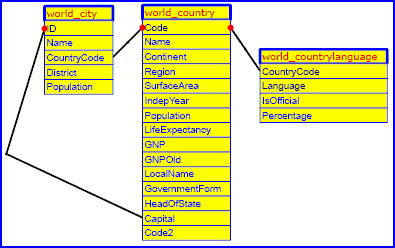
It's a programme to see the data from the "world" database avaible on the MySql website.
The database design is this one.
Click
 here to test this.
This program is a little CRM for IT services providers to give the possibility to client companies to manage their own contacts.
Every company will have a main user called manager in the rest.
The manager creates the contacts ( first name, name ....)
The manager defines informations that will be linked to the concacts according to the company needs.
These informations are two types:
Event: it is a meeting, a meal at one date.
Relation: it is a fact concerning the contact like he is important, medium, small, he speaks french, english, or italien ...
The list of contacts is unique for every company, and it will be shared between the company users with relation with the contacts.
The manager defines the users ( login, name last name, password ).
The user will have a list of contacts that he will pick from the list of contacts of the company.
For every contact, he will be able to add relations or events that the manager hed previously defined.
A contact can be shared by several users.
A request system allow the user to list among his own contacts the ones that satisfy certains relation. The result of these requests can be combined with AND, OR, NOT, XOR functions.
The manager can do requests on all contacts of the company.
The data design is the one under.
)
 .
here .
.
here .
Now we are going to use this examples to see the use of this system.
The aim is to build a program in this environment.
There is a minimal set of explanations. Don't worry if you don't catch all of them, it will come later.
The project approach will have three different layers :
Organisation layer ( Client needs )
The client wants to have a system to do his task list. Each user of the system will be able to put some new tasks in the system with a name and a priority level. The priority level is a number and each user will be able to see the task list according to its priority level.
The client also wants to find tasks according defined sequences ( word match research ).
Some users ( eg managers ) must be able to see the tasks of all other users but most of then will see only their own tasks.
A user can modify each task ( priority and text ), add or delete one.
Functional layer ( what do we have to do )
A Task table with a user ID, a task name and a task priority.
A user table with the user ID, his logging name, first name and last name.
We will need to have a function to display a list of tasks according to its priority and according to the fact that the task contains a certain word. From this list, one will be able to create new tasks, modify existing ones or delete them.
An other functon ( manager ) will display a task list with the user name.
So according to the user profile, differents menu will be displayed.
User: See my tasks Manager: See my tasks, see all tasks
A super user will have the possibility to enable other users and to assign them a user level ( manager or user ).
A manager will be considered as a user for his ( or her ) own tasks.
Technical layer ( how are we going to do this ? ).
See the next chapters.
Comment:
During the modification of a record, a lock is set up and during the next procedures, you might close windows during a modification and so, the lock will remain.
To take it off, go to the Profil menu then choose the option
See the locks then click on the Unlock button.
Click here to open a new window on MyPitSelf ,
enter 1/1 as username / password
The first thing to do is to create a new environment.
Note: for the moment, I have not worked enough on the privileges on the database so there is not a fine tunning of them.
The way it works is to define for each environment a mysql user/password ( or have always the same one ) and authorizations are set um for this user.
I advise you to use MyPitSelfDev, it works !
To do this, click here and perform the actions described.
To create a new environment means to create directories and a system database. ( look in folders mypitselfp and mypitselfw )
Click here to open a window if it's not already open. on the MyPitSelf environment and log in as 1/1.
We have to create a manager who will have the ability to use the new environment.
For the moment, there are 3 profiles in MyPitSelf:
and perform the actions described.
Cliquez ici pour ouvrir une nouvelle fenetre si ce n'est déjà fait
Quittez l'environnement principal si vous êtes connecté en tant qu'utilisateur 1/1
et connectez vous en tant que m/1
Comme vous vous êtes connecté en tant qu'utilisateur m, vous ne voyez pas les mêmes menus que précédamment, en particulier, les menus permettant de gérer les utilisateurs sont réservés au super utilisateur.
En revanche d'autres menus sont apparus et vous permettront de développer.
Il faut tout d'abord créer une image de la base de donnée. En fait cette image a déjà été créée lors de la création de l'environnement. Vous pouvez la voir en cliquant sur le bouton base du menu.
Puis il faut donner à cette image une existance réelle c'est à dire créer réellement la base dans MySql.
Pour ce faire, exécutez les actions que vous voyez en cliquant ici
.
Remarque: La base contient déjà 2 tables: Une table utilisateurs et Lock ( verrous ).
Ces deux tables sont créées car MyPitSelf est conçu pour travailler en environnement multi utilisateur.
Elles peuvent être supprimées ou modifiées mais pour l'instant, nous n'allons pas y toucher.
Puis il faut créer la table des tâches. Cette table est rattachée à la base et contient :
.
Maintenant il faut créer une requête permettant de lister les tâches. Elle resemblera à:
.
Maintenant, il faut créer un menu permettant d'afficher la liste des tâches.
Ceci passe tout d'abord par la création d'une fonction écrite en langage MyPitSelf.
Cette fonction sera ensuite attachée à un menu.
Pour ce faire, exécutez les actions que vous voyez en cliquant ici .
Utilisez un copier/coller pour éviter de réécrire la fonction.
Un petit mot ici sur le langage MyPitSelf puisque cette fonction a été écrite dans ce langage:
Cette fonction permettant d'afficher la liste des tâches de l'utilisateur
Maintenant, il faut créer une fonction permettant d'ajouter une tâche.
Nous allons utiliser l'outil pour créer une requête de type SELECT VALUE.
Ce type de requêtes a été défini car il permet de générer des instructions propres à l'affichage d'une entrée dans la base. Pour ce faire, exécutez les actions que vous voyez en cliquant ici .
Enfin, nous pouvons créer la fonction de type LISTTOP rattachée à la liste affichant la requête 1201
Pour ce faire, exécutez les actions que vous voyez en cliquant ici .
Enfin la dernière étape sera de regénérer toutes les requêtes, de compiler toutes las fonctions, d'établir la langue par défaut du programme et de créer les utilisateurs initiaux ( 0 = tous, 1 = super user )
Pour ce faire, exécutez les actions que vous voyez en cliquant ici .
Finalement, on peut commencer à tester l'application qui contient maintenant quelque chose.
Cliquez iciet choisisez le bouton Test pour ouvrir une fenêtre sur votre nouveau programme en vous connectant avec le nom/mot de passe 1/1.
Maintenant, vous êtes le super utilisateur du NOUVEAU PROGRAMME, vous pourrez définir les autres utilisateurs et leurs droits tout comme vous avez défini un nouvel utilisateur dans l'environnement principal.
Tout d'abord, il faut savoir que par défaut, le super utilisateur est aussi un utilisateur normal et peut avoir accès à tous les menus.Si lors de la création du menu ( plus haut ) , vous ne cochez pas la case "pas pour super", le menu est disponible pour le super utilisateur.
Maintenant, nous allons tester le menu tâches en cliquant ici .
Puis nous allons ajouter deux utilisateurs en les rattachant à des groupes d'utilisateurs
manager et utilisateurs qu'il faudra ensuite créer dans l'environnement de développement.
Pour créer ces utilisateurs, exécutez les actions que vous voyez en cliquant ici .
Puis nous allons définir deux groupes d'utilisateurs ( manager et utilisateurs )
dans l'environnement de développement
Les actions à faire sont celles que vous obtenez en cliquant ici .
Pour leur assigner des menus, les actions à faire sont celles que vous obtenez en cliquant ici .
Return to the development environment clicking here
and log in as m/1.
We will add functions to be able to see, update, duplicate or supress a task.
To supress a task, we need to create a request with a DELETE VALUE type. Look the request number created, we will use it in the functions.
Then we will create functions with LISTFUNCT type.
To do this, perform the actions you see when you click here .
Now we are going to test these functions
Click hereand choose the Test button to open a window on your new program, log in as user/password m1/1.
Then test doing what you see when you click here
Voilà, the first part of the organisational part is finished, now we will add functions to allow the manager to see all tasks.
Now we will built a menu to see tasks of all users for the managers.
To do this, we will have to create a request to list the tasks and the name of the user who has created this task.
This request will have two tables : the User table and the task table.
And, finally, we will create a new function and a new menu attached to this function.
Perform the action you see when you click here .
Then click here and choose the Test button to open a window on your new program, log in as 1/1.
Attach the new menu to the manager group performing the actions you see when you click here
.
As you are user 1, you can try to click on the button of the menu now.
The client wants to add functions:
From the task list, the mananager should be able to
Create a task for a use other than himself.
Update a user task and particulary, change the user of the task.
How can this be done ?
I think you understood that MyPitSelf uses linked tables.
For example, during the development, you have noticed
that we have attached a menu to a function, a table to a database,
a field to a table, a menu to a group of users, etc ...
We are going to create a link specification.
The link here is that a task is attached to a user.
When a manager has to give a user task to an other user, he must be able
to choose a user in the existing user list ie the user table.
We will have to create
.
.
.
.
These examples have showed you how to develop with MyPitSelf and a part of its functionnalities.
As MyPitSelf is mostly done with MyPitSelf, the best example of developement can be obtained
when you connect to the MyPitSelf environment with user/password 1/1 .
Then click on the "tool"
menu and then choose the button "Set or unset developing mode for MyPitSelf".
All menus will
be seen then and you will be able to see the core.
You also can use the button "See/hide function call" in the "profile" menu to see which requests/functions are used.
An essential point in MyPitSelf is that fonctions written in its language are parsed to units
that are visible using the button print facing the source of the functions in the function list
( try it in front of function 4003 ).
The ressult of this parsing is a grid that can be put in a database table.
Records of this table can be analysed and updated with the MyPitSelf Language.
One can then reverse ingeener the functionnalities on this grid and regenerate the source.
See the chapter "language reference" for more details about this subject.
See also the next chapters.
I haven't mentioned many other aspects, I have to enhance this documentation but I'm pretty sure you got the main points.
MyPitSelf will evolve because there are still functionnal gaps, but as nearly everything is
in a database, including programs, that programs and data
are linked and programs are finally considered as data to treat ,
the "only thing" to do is to add data and treat them.
When one has to develop data models that look like the MyPitself data model you have seen on the home page, it is nice to have a tool to help.
I think MyPitSelf is cool to deal with data models with many links.
The MyPitSelf language evolves constantly because of its own concept and because improvements are brought, but it will remain with only function calls returning true or false.
It is a "blending" of
lisp for the nested treatments and true or false return values
C for the function calls
Assembler for the stack mechanism
The best method to learn this language is like for all languages:
- Look and do the development examples given above, this will make you familiar to the basic concepts and the development environment.
- See examples of this language. for this, go to the MyPitSelf environment as user 1/1 and to choose in the tool menu the button "Set or unset Developping mode for MyPitSelf" and to look at the functions.
This function refererence is mostly done so that when I need to write some source, I can copy the example and then paste it in the source.
When you are in the function list, the  button gives a result under a table view.
In other words, if a function is f(g(x),h(y)), the table result of this function is
| Function# | Parent Number |
Order In Parent |
Function Name |
Function Type |
Number Of Children |
Level |
| 0 | -1 | 0 | 0 | INIT | 1 | 0 |
| 1 | 0 | 1 | f | formula | 2 | 1 |
| 2 | 1 | 1 | g | formula | 1 | 2 |
| 3 | 2 | 1 | x | zone | 0 | 3 |
| 4 | 1 | 2 | h | formula | 1 | 2 |
| 5 | 4 | 1 | y | zone | 0 | 3 |
Tac(
 T0.ID,
 doSomething(),
)
And the new format is:
Tac(
 Field(T0.ID),
 doSomething(),
)
To do this, I wrote functions that did that job.
Variables can contain any basic type of data ( strings, dates, times...) but not yet arrays
There are two sets of variables.
Some are declared and named ( see SetVar below ) and are contained in a stack: It's the variable stack.
Others are put in a stack by programs. It's the Call Stack.
As MyPitSelf is based on data, some instructions extract data from the databases and puts them in the call stack.
The way to reach the variables put in the call stack is by giving a number which represents the position in the call stack:
If the call stack contains ( it is filled going downwards )
hello
world
SetVar(xxxx,yyyy[,yyyy]) for local variables
or
SetVarG(xxxx,yyyy[,yyyy]) for global variables
Where xxxx can be:
a variable name ( no spaces or special characters admitted )
Var(xxxx) : The content of the variable whose name is xxxx. ( equivalent to the $$ in php ).
yyyy can be:
-Var(zzzz) or VarG(zzzz): The content of the variable zzzz, zzzz must exist.
-Chr(n): where n is the ascii code of a character. It is useful for specials characters like Chr(10) or Chr(13)
-Cst(xxxx) : A constant, it can be a string or a number.
-n: A number which represents the niest last character of the CallStack.
-Display(nnnn) : nnnn is the message number in the msg list ( usefull for internationalisation )
-Funct(nnnn) : nnnn is a function number: It replaces the Cst(nnnn) because if someone give a new number mmmm to nnnn, all Funct(nnnn) will be
moved to Funct(mmmm).
-Stack(oooo) : oooo is a name of a variable which contain the position of the element to fetch in stack.
- SessionVar(ssss) : ssss is a name of a constant to get in $_SESSION .
- HttpPostVar(pppp) : pppp is a name of a constant to get in $_POST .
- Num(qqqq,x) : qqqq is a name of a variable, x is the number of decimals.
- Env(rrrr) : rrrr is a constant representing the environment variable to get ( php getenv() )
- XVS(zzzz) : gets the content of the variable which is in the Variable stack ( zzz is the variable name )
Examples:
SetVar(MyVar01,Cst(Hello),Chr(39),Chr(32),Cst(world)), // puts "hello, world" in MyVar01.
SetVar(MyVar01,Cst(25.5)),                             // now, it contains 25.5
SetVar(MyVar01,Cst(0)),                                // now, it contains 0
SetVar(MyVar02,Cst(ACombinedvar),Var(MyVar01)),        // MyVar02 contains ACombinedVar0
SetVar(Var(MyVar02),Cst(25.5))                         // ACombinedVar0 is created as a new variable
                                                       // and contains 25.5
SetVar(toto,Display(1000011)) // puts the content of the message n# 1000011 in toto
An environment has it's own variables like
the folder of it's programs
The user code of the current user,
Default values for data ....
Go to the profile menu and use the "see/hide function call" button to see function calls.
Then a button appears on the main menu ( print variable stack ).
These predefined variables can be seen using this button. They start with xxx.
These variable are in the variable stack just like the ones the ones declared with SetVarG.
The pvs() function can be used to display variables in a program.
For the moment, one can update these variable which is absolutely not correct and has not to be done but this will be enhanced to have more control on the use of the "system variables" according to the user profile.
They are basic because most operations are done using values in the call stack.
Tac: pushes values into the callstack
Puts in the call stack the value of a variable.
It is usually used to return some values: as this language returns only true or false,
if you want to get something different from a function call, you can use the
call stack and put some values in it.
Example
Fills a variable with a value according to it's data type:
It is mostly used for ENUM and FLAG types
Example:
Tac( SetVar(DataType,Cst(1002)), SetVar(Value,Cst(1)), FillVar(Libelle,DataType,Value), // Now Libelle containsFillPgmVar(Libelle,DataType,Value), // Now $Libelle contains <img src="img/picto/13x13/cc.png" /> Ech(Var(Lib)), )
To put a number in the local format, do:
Tests a contition to execute or not execute a treatment
Loops n times a treatment.
Compares the last value in the call stack to some constants to execute functions
Compares with the last value un the call stack
Opens and close a file after treatment. The syntax is:
a0_File(
 FileName(xxxx),
 FilePtr(yyyy),
 Action(z),
 Do(ffff())
)
where:
xxxx is a variable in the variable stack which contains the name of the function.
yyyy is a variable name which is created in the variable stack which will contain the name of the pointer to the file. This variable can be used in the ffff() function.
z : equals a ( append ) or w ( write ).
ffff : is a function name to call.
You don't have to close the file, it is called when the function is finished.
Example:
Setvar(MyFileName,VarG(xxPtaW),Cst(hello.htm)), // Fills the variable MyFileName with
                                                          // the the file name
SetVar(MyFileContent,Cst('<body>Hello, world</body>')), // Fills the File content
a0_File(
 FileName(MyFileName),
 FilePtr(MyFilePointer),
 Action(w),                                            // the file is [re]created
 Do(
  a0_WriteVarStackInFile(MyFileContent,MyFilePointer)  // file is written
 )
) // file is closed here
Writes the content of a variable in the variable stack into a file.
Example:
Writes the content of a variable in the variable stack into a file adding a Begin Php Tag at the begining of the file and a End Php Tag at the end of the file.
Example:
Read the content of a file and put it in VarStack. The syntax is:
Writes a file content as binary data, useful for copying images.
example: Copy the content of img directory which contains images
Creates or delete a directory, the syntax is:
deletes a file.
The syntax is:
Puts in the call stack a list of files in a directory according to a file name ( ereg function )
Example: to list the skin files, the function used in MyPitSelf is:
List directories of a directory.
Example: The .css files are created in the MyPitSelf environment. After their creation, they must be copied in the other programs so this function is used:
Copy file matching a given pattern from a directory to an other one.
Example: The .css files are created in the MyPitSelf environment. After their creation, they must be copied in the other programs so this function is used:
Check if a file exist, must be put in a test
Displays a list of values obtained from an SQL request.
The syntax is
| SELECT DISTINCT | add a "DISTINCT" in front of the select |
| LIST LIMIT | Fixees the number of record to be output |
| Line height | Line height in pixel of the list |
| Cell padding | Cell padding in pixelx of the values in the list |
| OPTION COLUMN WIDTH | width of the column that contains the option buttons |
| Do not put the list in a table | Normally, a list is put in a table, setting this flag to 1 prevents it. |
| GoTo buttons in a list |
Add one more access buttons in a list
|
| Line function | Reference of the line function to use to display the data |
| Header function | |
| NoMenu | |
| Before list function | |
| After list function |
 and
and  buttons to see the next records and the counter (xxx->yyyy)/zzz on the top of the list are not displayed
Display a record on the screen for Create, View, Update or duplicate.
The syntax is
Interactive input ask to the user
Syntax:
out(n) // outputs the n'iest last value in the call stack ( for debug purposes )
out(bla bla) // outputs bla bla
out() // outputs a line break
ShowMsg(n) // outputs the message number n.
Ech(Var(MyVar)) // outputs the string contained in MyVar in span LISTTITLE attribute.
Ech1(Var(MyVar)) // outputs the string contained in MyVar without any HTML attribute.
Example, let's suppose that msg # 1000011 contains "hello, world"
Delays the execution of the outputs of n seconds.
Syntax:
Displays the menu
For the Example: to display the documentation chapters in MyPitSelf, the function starts with
Usually, the back button only displays the list functions.
But sometimes the menus call functions that are not lists, so if you wish to use the backs button in this case, use this function.
Example: to display the documentation chapters in MyPitSelf, the function 6770 starts with
As we use HTML, PHP, JavaScript containing HTML or Javascript containing Alert() function, many cases are
possible because the string delimiter, the carriage return, the ditable fields can contain many cases.
Keep in mind that the string delimiter in MyPitSelf is '.
The ' can be put in a string using \'.
The \ can be put in a string using \\.
Converts the content of a variable to htlm characters
Converts a string to a string that can be the content of a javaScript alert message.
The line feed (lf) is converted to the \n
The carriage return ( cr ) is converted to nothing
the \ is converted to \\
the ' is converted to \'
Converts a string to a string that can be the content of a javaScript variable.
The line feed (lf) is converted to the BR tag
The carriage return (cr) is converted to nothing
the \ is converted to \\
the ' is converted to \'
Converts a string to an html edit
the carriage return is converted to nothing,
the line feed (lf) is converted to & # 10 ;,
the ' is converted to & # 39 ;,
the \ is converted to & # 92 ;,
Converts a string with
\ is converted to \\,
' is converted to \',
Converts a string to a Constant.
Example: in the Tool menu, the function that converts a string is:
Does an ereg() on the last value in call stack
Syntax:
Match(xxxx)
where xxxx is the ereg string
For example, to test that a new password is correct, MyPitSelf uses the function
CutWithLastChar(MyVar,Var(Value),Cst(',')),
Cut the value from the last position+1 founded of the third parameter ( Cst(',') here ) in value to the end and puts the result in MyVar.
Example
CutWithoutLastChar(MyVar,Var(Value),Cst(',')),
Cut the value from the last position founded of the third parameter ( Cst(',') here ) in value to the end and puts the result in MyVar.
Example
Cut the value in call stack from a position ( starts with 0 ) for a length
Example
Example:
ReplaceString: replace a string with an other in a string
Example:
RepPreg: replace a string with an other in a string using the preg specification
Example:
Return true if a string is found in an other string
Example:
Returns the position of a string in an other string, strrpos starts the research from the end of the string
Returns the lenght of the string
Example: To show the database schema:
Converts an hexadecimal string to a decimal string
Creates a head string for the trees.
Puts a value in a span
Put the content of stack in a hidden span.
Setvar(aVariable,HiddenSpan(SPANNAME,i)),
i is the stack position of the element to put in the span
example:
Copy the content of a span to an other.
Puts nothing in a span
Hide the content of a span
Declare a div with an ID and a style
use as : SetVar(temp,table0()), Ech1(var(temp)), equivalent to
<table border="0" cellpadding="0" cellspacing="0" summary="">
use as : SetVar(temp,table0()), Ech1(var(temp)), equivalent to
<table border="0" cellpadding="0" cellspacing="0" summary="" align="left">
use as : SetVar(temp,tdnowrap0()), Ech1(var(temp)), equivalent to
<td class="nowrap0">
This set of function does a tree management
They may seem a little complex but in fact they are generated by a set of functions that takes a table that is self-referenced.
See the use of this tree generation in the How To's
This function initialises a tree:
The tipical use of this function is:
There are two functions:
- One for the root
- One for the branches
These functions output a tree branch
A typical use of them is:
This function is used to add buttons to the current selected branches
A typical use of this function is:
Updates the "field" in the parent window with a NUMERICAL value
Every sql request with a type = SELECT or INSERT or UPDATE or DELETE or DELETE VALUE you create will produce a function.
This function can be used in the language to do the work
The FIRST EXAMPLE section of this documentation give some examples of the use of this button.
When you use this button, all the informations about the request are put in tables so the request can be regenerated and can be analysed according to it's type and thus, it's use.
The request generated with this button are simple. No LEFT/RIGHT JOIN are possible yet.
You can add some little enhancements by using the "Complementary field" or the "And more" fields.
If you need a very complex request, you can create one, then change its type to MANUAL and then write what you want.
Be careful in that case to respect the good number of parameters in the request specification.
a select request that looks like this:
Select T0.FIELD1 , T0.FIELD2,,,T0.FIELDn From MyTable T0
Produces a function named R_nnnn_Select() where nnnn is the request number.
The use of this function is
a DELETE request that looks like this:
DELETE From MyTable where FIELD = %SQLPAR0%
Produces a function named R_nnn_Delete() where nnn is the request number.
The use of this function is
an UPDATE request that looks like this:
UPDATR MyTable set FIELD = %SQLPAR1% where record = %SQLPAR0%
Produces a function named R_nnn_Update() where nnn is the request number.
The use of this function is
An INSERT request that looks like this:
INSERT into MyTable set FIELD = %SQLPAR1%
Produces a function named R_nnnn_Insert() where nnnn is the request number.
The use of this function is
an MANUAL request that looks like this:
SELECT count(*) as res from MyTable where FIELD = %SQLPAR0%
Produces a function named R_nnn_Manual() where nnn is the request number.
The use of this function is
One can update session predefined variables ( SessionVar function)
or
define new session variables ( SessionValue functions )
If you need a session variable, you can define one and update or get it's value using these functions.
Example: you can put in the loggin function (4003) this code.
Gets a POST variable
Example: This example is the source to get the user name when the user logs in
Sets a Post variable
Gets the $_SERVER variable
Example:
Check that a session value exist. Example
Check that a $_POST value exist.
example:
Check that a $_GET value exist.
example:
There are 2 ways to gat a cookie:
First way: put it in the stack:
These functions are set to work with date and time.
Note: I suggest that one creates a table with a calandar, fill it once every five or ten years and work on these values instead of going on computing always the same things.
Convert a system format date (yyyy-mm-dd) to a date according to the system setup
Example:
Computes the day after the one in the call stack. The date must be in a system format (yyyy-mm-dd)
Example:
Gives the day yhe week of the dates placed in the call stack:
0:sunday
1:monday
2:tuesday
3:wednesday
4:thursday
5:friday
6:saturday
Example:
add n seconds to the execution of an interactive function. A SetTimeLimit(0) (no limit) is always called before a batch function.
Syntax
setTimeLimit(10) // adds 10 seconds to the php time limit, see the php doc for this.
Functions for reverse engineering
you must include the function
a0_useRev_0()
before using them
Converts a text function to an array
| Ind | Function Number |
Parent Number |
Order in Parent |
Function Name |
Function Type |
Number of Children |
Level | C1 | C2 |
| 0 | 0 | -1 | 0 | 0 | INIT | 1 | 0 | ||
| 1 | 1 | 0 | 1 | Tac | formula | 2 | 1 | ||
| 2 | 2 | 1 | 1 | Cst | formula | 1 | 2 | ||
| 3 | 3 | 2 | 1 | 30 | Value | 0 | 3 | ||
| 4 | 4 | 1 | 2 | R_1203_Select | formula | 1 | 2 | ||
| 5 | 5 | 4 | 1 | Do | formula | 2 | 3 | ||
| 6 | 6 | 5 | 1 | Take | formula | 1 | 4 | ||
| 7 | 7 | 6 | 1 | T0.Nom | zone | 0 | 5 | ||
| 8 | 8 | 5 | 2 | out | formula | 1 | 4 | ||
| 9 | 9 | 8 | 1 | 1 | Value | 0 | 5 |
Converts an array function to a source function
Load an array in the table yArrayFunct
Load the content of table yArrayFunct to an array
Rev_TakeOffFunct() takes off functions in a source
Two functions, 1001 and 1002, can be used to build a button that appear on the screen.
1001 builds a button without a javascript confirmation
1002 builds a button with a javascript confirmation
An example of the use of these functions is given above:
Functions, 1003 builds a button that opens an other window.
An example of the use of this function is given above:
This function is used when you want to submit the main window with a function.
As the main window is submitted, the sub window is closed.
To unlock manually a user record, you can use function 1006 with the paramaters:
TableCode
FieldCode
Set the HTML content of an element with an ID (innerHTML) to a value.
example:
Executes the function in stack and submit
Example: to create a new request, one choose a table to get the table code and then the program ac_yTable_CreateSelectRequest is called. To do this, we use
Executes a function and continues the execution without submitting.
It is a kind of an "Eval" function.
Example, In the little CRM, in the sub window that contains a list of the other user that have a contact in their list, I want to keep track of the list filter the user enters ( criterias ). But as it is in "only" a sub window, I don't want to keep track of this in a session variable or any other method.
So in the first list I Build this string :
Return true if the MyPitSelf function looks OK.
Example: when one creates or update a function source, the test which is done is:
Executes the function in a batch mode
Syntax:
If wou want to save the html output in a variable
Example:
To be used after a compilation, tests if a php source is correct. Example:
|
A screen copy of this tool can be seen here. |
)
|
 Maquillage button
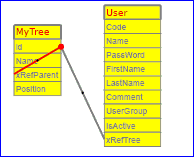 .
.
.
.
.
.
.
.
.
.
The md5 password of the user with login/password=1/1 is
6512bd43d9caa6e02c990b0a82652dca
So if you want to update it in the database, use this SQL request:.
I think the best way to make a documentation of a program is to give screen copies of the actions to do.
If you want to do this, use the menu "profile/Record the next actions for documentation".
When this mode is set, a screen copy of each screen will be output in an html file.
You can see the result of this in the example chapter.
As I do not like ODBC, I prefered do this convertion program in VB and work directly in MySql
First, check that you have something like this in the visual basic project library list ( tools/references )
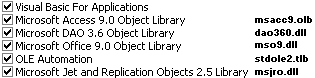
Then create a new module containing the code under and read carefully the first 10 lines
of comments
To see this documentation in one page click here.
To see this documentation in multipage, click here.
This documentation helps me sometimes ( I do NOT like SQL Join but I must admit that sometimes, it helps ! )
The fck editor may be used and if you define a data as HTML type and you give the name mypsFckHtml1
to this type, then you must add this definition to the file fckconfig.js.
Ceci est un nouveau texte créé dans « word » sans mise en forme initial. On ajoute des retours à la ligne comme après le point suivant.
Maintenant, on ajoute des caractères GRAS ou italiques ou soulignés, voir même, les trois à la fois.
Avec un double saut de ligne et
un saut de ligne forcé en restant dans
le même paragraphe ( shift entrée ).
Portez ce vieux whisky au juge blond qui fume sur son île intérieure, à côté de l'alcôve ovoïde, où les bûches se consument dans l'âtre, ce qui lui permet de penser à la cænogenèse de l'être dont il est question dans la cause ambiguë entendue à Moÿ, dans un capharnaüm qui, pense-t-il, diminue çà et là la qualité de son œuvre
L'île exiguë
Où l'obèse jury mûr
Fête l'haï volapük,
Âne ex æquo au whist,
Ôtez ce vœu déçu.
Dès Noël où un zéphyr haï me vêt de glaçons würmiens, je dîne d’exquis rôtis de bœuf au kir à l’aÿ d’âge mûr & cætera ! ·
il y a une tabulation à la fin de la ligne précédente.
&é~'{}'()[]-|è`_\ç^ à@°+=¨µ*%ù§!/:.;?,<>¤£²
L’essai a-t-il été concluant ?
modif 1 € , un backtick => `
“Guillemets bizarres” de « word » ‘ça passe ?′
‘’‚‛“”„‰…•!"#$%&'()*+,-./:;<=>?[\]^_`{|}~°®©¡£¤¥¦§¨©ª
«ÉÈËÊ¿¾½¼»±²³´µ·¸¹ºæ÷
αβγδεζηθικμνξοπρςστυφχψω
℅™€⅓⅔⅛⅜⅝⅞♠♣♥♦♪♫'...
Where the hell is matt ?
TED.COM:
Paradox of choice
Why are we happy
Why are we happy (more)
the expected value of any of our actions that is the goodness that we can count on getting
is the product of
the odd that this action will allow us to gain something
and
the value of that gain to us
8 secrets of success
Bouing ! :-))
koolsol : a progressive web app solitaire game :-))
lighthouse score rank for pwa

